
NFC Vault provides secure and simple cloud drive access, making it easier to store and access your data with fast performance and a smooth digital experience every time.
Learn More →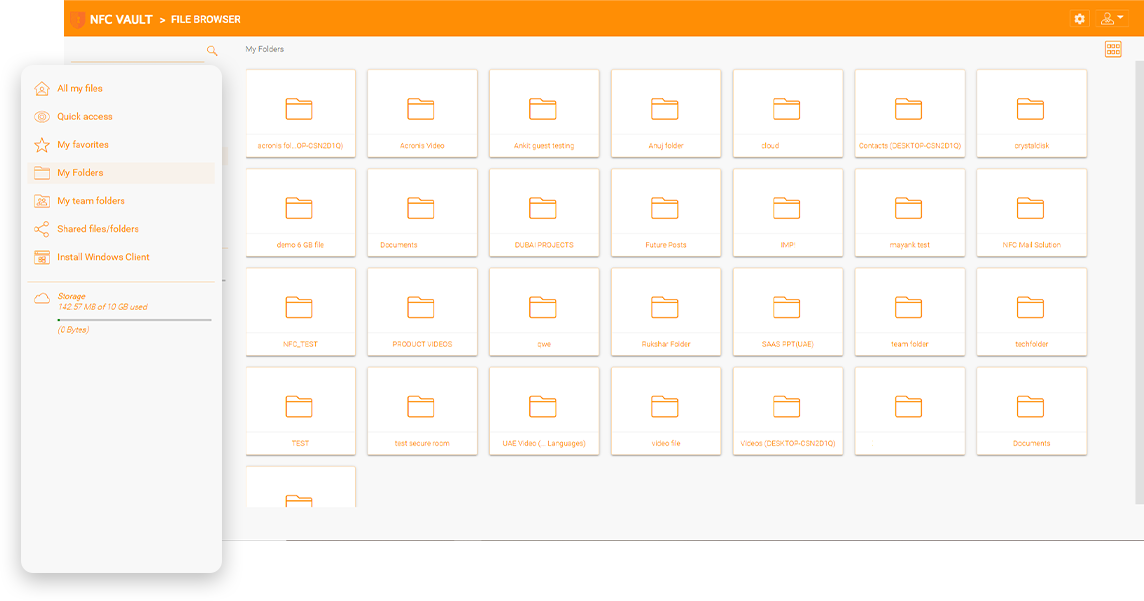
Businesses often struggle to access and manage cloud storage or map network drive access as easily as local drives in modern work environments. Complex VPN setups, manual configurations, and scattered data systems across platforms make the process more difficult and time-consuming. These issues can slow down daily operations, reduce productivity, and create frustration for both users and IT teams, ultimately affecting workflow efficiency and overall business performance.
Remote access often depends on VPN configurations, which require technical knowledge and involve time-consuming setup, making the process difficult and frustrating for many businesses managing distributed teams and systems.
Many businesses still rely on manual setup for access and drive management, which increases the risk of errors, creates inconsistencies in workflows, and adds unnecessary operational delays for IT teams.
Managing files across multiple platforms and locations can make it harder for teams to find information quickly and collaborate efficiently, slowing daily operations and reducing visibility across systems.
Lack of smooth integration with existing systems can disrupt workflows, lowering productivity, increasing downtime, and negatively affecting overall user experience and organizational performance.
Drive mapping is an important feature for online file access. End users can easily drag and drop files and folders from a set of mapped drives over the Internet without a VPN connection.
File locking is a vital feature for online file access and team collaboration to avoid conflicts. End users need to control global concurrent online file access by using file locking to maintain consistency.
Dropbox and Google Drive don’t have the same level of centralized control as a file server. You might miss the NTFS permissions and the ability to know where your data is, who has access to it and what they’re doing with it.
Drive Mapping and Support improve cloud storage access through seamless integration and help businesses manage daily operations more efficiently. It creates a local drive-like experience, removing the need for complex VPN setups and manual configurations. Businesses can adopt cloud storage faster while reducing the workload on internal IT teams. Employees can access cloud files directly from Windows Explorer, reducing delays caused by VPN logins and disconnected storage systems. It also helps businesses keep sensitive files secure while meeting compliance requirements.
Cloud files can be accesses through mapped drives in File Explorer without relying on VPNs or complicated setup processes, creating a smoother and more familiar user experience.
Simplifies data management across different platforms, locations, and storage environments, reducing administrative workload while supporting day-to-day operations across teams and departments.
Delivers secure file-level access controls that help protect sensitive business data while supporting compliance requirements, including HIPAA and other industry standards.
Integrates naturally into existing workflows with a familiar interface, allowing users to adapt quickly, reduce training time, and help teams work comfortably with less training across the organization.

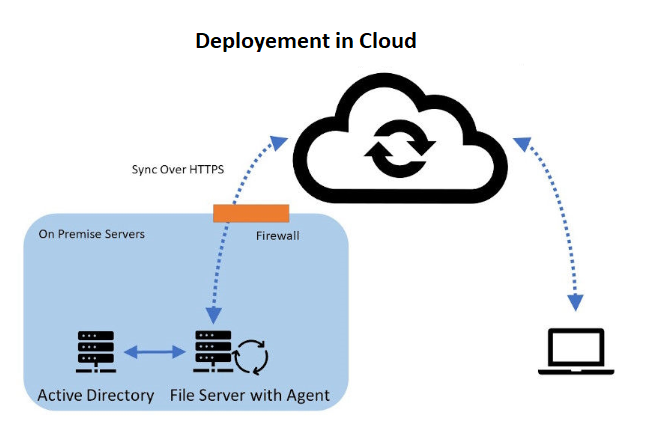
Hybrid Local File Servers
Gladinet enables seamless file server integration with support for Windows 2016/2019/2022, offering indirect & direct connection options and flexible access.
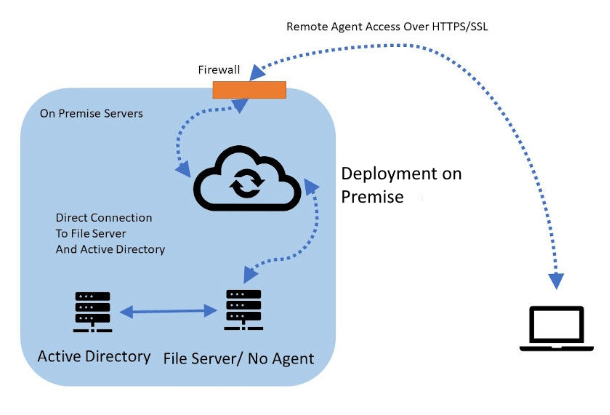
File Servers with Direct Cloud Access
Gladinet provides a direct file access solution from remote devices and mobile devices, offering a streamlined and secure method to access internal file servers via HTTPS/SSL.
NFC vault, our Unified Remote Data Management Platform, streamlines remote data management and access for businesses by providing a secure, efficient alternative to traditional VPNs. It integrates with existing infrastructure, supports Autodesk, and enhances global collaboration without compromising security.
Integrates with your existing on-premises file servers and cloud services without the need for VPNs.
Provides HTTPS-based, secure access to files from anywhere, eliminating VPN vulnerabilities.
Improves performance with local caching for offline access and faster file retrieval.
Uses existing AD credentials for seamless access control and authentication.
Prevents data conflicts by locking files during edits, ensuring integrity in collaboration.
Enables secure file sharing across locations, enhancing team productivity globally.

A healthcare innovator transformed its clinical trial processes by adopting a cutting-edge data management solution, overcoming challenges in data storage, access, and security. This transition facilitated seamless integration with cloud storage, eliminating cumbersome VPNs and manual logins, thus enhancing operational efficiency and data security. The solution, tailored to support a fully remote operational model, not only met but exceeded scalability needs, setting a new standard in clinical research efficiency. This case underscores the importance of adaptable, customer-centric solutions in advancing healthcare technology.

A leading technology firm revolutionized its operational efficiency and market positioning by implementing NFC Vault, overcoming challenges in service description and global collaboration. This strategic move enabled real-time file management and collaboration across global teams, significantly improving operational efficiency and reducing IT costs. The transition to NFC Vault's cloud-based environment not only enhanced data security but also filled a critical gap in the firm's market positioning, making it more appealing to small and medium-sized enterprises. This case demonstrates the transformative power of effective digital solutions in streamlining operations and boosting market appeal.
Ensures secure, efficient cloud transition with single sign-on, streamlined user management, and security compliance.
Advanced protection ensures data integrity and recovery with blocking, auto-restoration, and business continuity features.
Seamless cloud integration for secure file access without VPNs or manual setup. Simple and effective management.
Secure remote file access without VPN. Enhanced with NFC vault and CentreStack for high-performance connectivity.
Boost productivity with offline access and background sync — ideal for remote work and unstable internet areas.
Prevents simultaneous file edits to protect document consistency and ensure real-time collaboration.
Our team will get back to you shortly.