
Experience next-level digital storage with NFC Vault — where your data stays safe, accessible, and lightning-fast.
Learn More →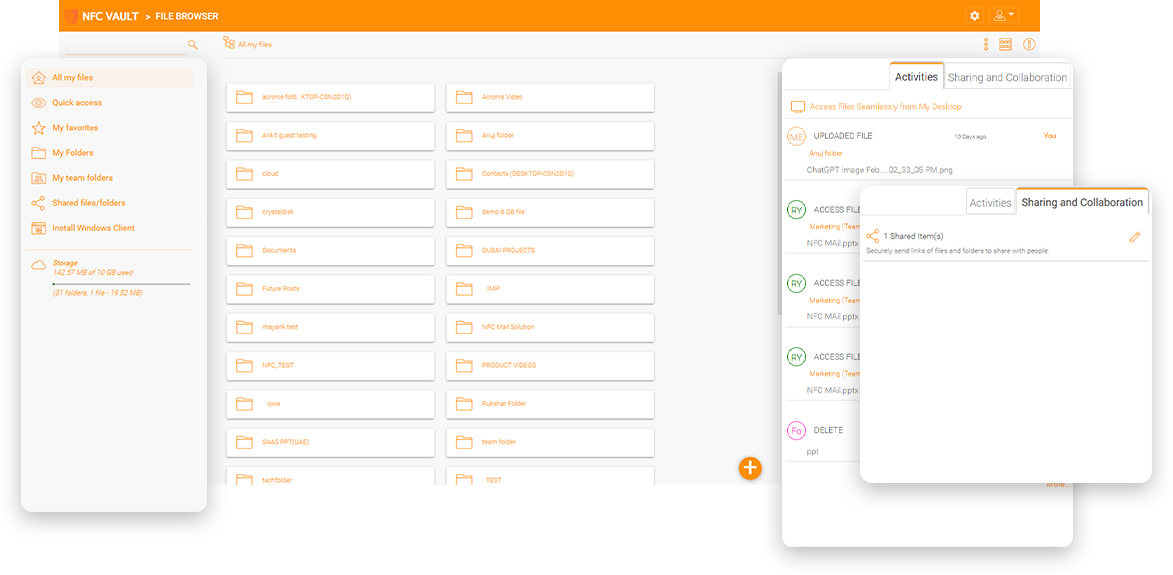
There is a design and architecture firm in a city where the only Internet service provider offers upload speeds of only 50 megabits per second (Mbps). Users connected to a file server at about 5 - 10 TB to access files in the office. However, with the mobilization of the workforce and the proliferation of the work-from-home model, employees who worked from home found it difficult to access their files, resulting in lost productivity. With the increasing number of remote users connecting to office facilities, companies like this struggled with bandwidth capacity issues. The much heavier load was straining corporate infrastructure connections. Employees working remotely either did not have access to the Internet, or their connections were so poor that they hurt productivity. The office Internet speed became a bottleneck, causing users to experience latency when accessing files remotely.


Since the local ISP could not solve the slow uplink problem without a significant infrastructure upgrade, the company considered moving the file server to the cloud. There are two different strategies for doing this. The first is "lift-and-shift", the second is the combination of cloud file server and local file server.
Lift-and-shift is easier if the office Internet is fast, so a site-to-site VPN between the office firewall and the cloud virtual network acts like part of the local network.
The hybrid cloud file server is a good balance between the local file server and the cloud file server, so employees in the local office can still use the file server over a local network.
Remotely access files in cloud storage via a mapped drive letter without the need for a VPN. Mobile apps included!
Minimize storage and bandwidth consumption by automatically synchronizing and caching only the files you need.
Encrypt remote agent caches or revoke remote agent access privileges from a central management console.
Access shared files and folders in an offline mode, disconnected from the Internet, and synchronize them when back online.
Suppose the file server's data set is more than one TB, with unique custom applications, databases, Adobe, AutoCAD, Mac users, or other factors mentioned above. In that case, the IT team may not want to try SharePoint for the following reasons.
5,000 item - When you have a large number of items in a document library, the performance degrades to the point that it becomes unusable.
300,000 item - This limits the number of documents users can sync using the OneDrive sync client. Performance starts to degrade.
400 Character URL Limit - The URL path for all files and folders must be 400 characters or less (and no more than 400 characters for any single file or folder name in the URL).
Businesses in rural areas with slow upload bandwidths have no choice but to find an alternative way to keep their employees productive as the population shifts to the work-from-home model. They also want to provide a local copy of sensitive data if Internet access fails for security and ownership reasons. They found a solution that allowed them to migrate their on-premises data to Azure and bypass connectivity issues for employees. They wanted bulletproof security to prevent employees from downloading or copying sensitive data to their personal computers or devices.
NFC Vault is the hybrid online file server solution for you, simplifying remote access, online file sharing and file server management!
Simplify remote access to file servers from mobile devices, PCs, Macs and web browsers.
Maintain a local file server that enterprise users can access over the local network without modification.
Employees working from home can connect directly to the Azure or AWS data center for faster access.
The default method for accessing file servers in Azure/AWS is to use a VPN agent. However, VPN requires an active connection to the file servers and does not support offline editing mode. Therefore, Internet disruptions can interrupt a user's typical workflow.
A great way to use Azure/Aws file servers is to map a drive to the file server over a VPN. The frequent exchange of request and response messages between the local drive and the remote server without local caching makes it difficult to browse large folders.
Working with large files is not easy, even with a VPN agent connecting to the file server in the cloud. Applications like Photoshop or AutoCAD usually generate large files and use many linked files. These applications suffer from a slow VPN.
NFC Vault sets up two-way synchronization between your local file server and the cloud storage service.
NFC Vault provides web browser-based methods for file access. It also offers mobile apps for file access and sharing from mobile devices
The solution integrates with local IT infrastructures and public cloud storage services like Amazon S3 and Windows Azure Blob.
NFC Vault provides cloud drive mapping and file locking capabilities for remote access to file servers without a VPN.
Web-based secure data room allows view-only access to shared folders with download disabled.
Define different permissions for folders at different levels of the directory structure or inherit from NTFS permissions directly.
You can define user rights for folder sharing from internal Active Directory users to external clients and partners..
Access shared files and folders in an offline mode, disconnected from the Internet, and synchronize them when back online.

NFC Vault eliminates the common drawbacks of a file server and a cloud-based file sharing solution and provides the best of both worlds - the security and control of traditional file servers combined with the efficiency and productivity of cloud collaboration.
The web browser file manager is responsive to different screen resolutions and device profiles.
Single sign-on from ADFS, Azure AD and other SAML providers is supported.
Manage file revisions and change history through the file portal in the web browser.
Web-based document viewer for office documents.
Drag and drop to upload local files into web folders.
Free and unlimited read-only guest users are available in the solution.
Our team will get back to you shortly.