
Experience next-level digital storage with NFC Vault — where your data stays safe, accessible, and lightning-fast.
Learn More →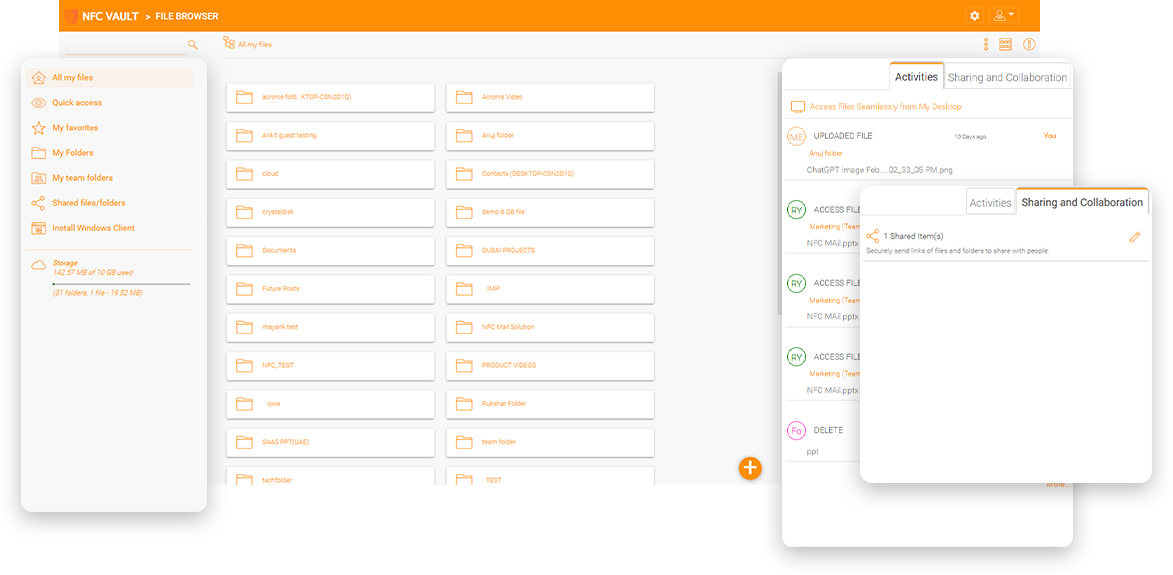
A marketing firm has many files on an on-premises file server that includes graphics files, such as Adobe Photoshop files. Due to the COVID-19 pandemic, the IT director wants to enable remote access to these files for employees working from home and remote locations. The company allowed a VPN connection which typically runs over the Internet, but the Internet has quite different network characteristics than a company or home network. Local networks usually offer a high amount of download bandwidth, low and stable latency, very little packet loss, and almost no data corruption. Contrary to that, Internet connections offer a lot less bandwidth and have a relatively high, very fluctuating latency, and data corruption is a norm.


An advertising agency does a lot of digital advertising, including online advertisements, online websites, online inventory, and social media. Their photo libraries doubled in size last year. The photo libraries span several network shares, with each share totaling more than 250 GB. The total size of the library is around several Tera-Bytes, including creative artworks dated back to early 2000 with more than 100,000 files. Since the start of the pandemic, employees started to work from home. The most significant pain comes from accessing the photo libraries from remote and home locations. Creative designers need to visit the photo libraries frequently, and directory listing is prolonged and accessing the files is slow for this amount of data every day. The slowness is so intolerable that one employee has to come back to the office to complete the design work.
NFC Vault bridges file servers and cloud storage for secure remote access without the need for a VPN.
NFC Vault leverages cloud storage for secure mobile file sharing from a web browser or a mobile application.
Accessing files and folders directly from within a web browser is as interactive as from a desktop drive.
Access files and folders from your Windows or Mac devices without the need of using a VPN!
Run the NFC Vault installer on a clean Windows Server, and the installer will install all dependency components. Basic setup and configuration require only a few minutes. A reboot is required after the installation.
Enable Active Directory integration and file server discovery. You can then publish file server network shares to Active Directory users for secure, remote, and mobile access from remote and mobile devices.
You can use the NFC Vault professional services team for setup, configuration, and training or work directly with one of our authorized partners. We will help you set up the NFC Vault server to integrate with your IT infrastructure.
Traditional drive mapping over VPN uses the SMB protocol over a wide area network to access file server network shares. The SMB protocol is very chatty, so many requests and responses are coming back and forth between the corporate file server and the remote device. HTTP streaming removes the dependency on VPN and also uses a faster streaming mechanism.
Accessing the file server from a remote location is not as fast as accessing files from a local cache. One of the problems of VPN is that it doesn't allow offline editing. It will be much easier if users can edit files locally, and the files will automatically "check-in" upon reconnecting to the corporate network.
Cloud means one of the big three cloud players, Amazon AWS, Microsoft Azure, and Google Cloud. These vendors have data centers that have high bandwidth and low latency. Setup a bi-directional synchronization between local file servers and cloud storage services speed up the file access.
The NFC Vault solution extends the current internal Windows file server's reach to remote locations via HTTPS and web protocols. It is privacy by default.
The internal Windows file server is the data repository for the newly added remote file access service. For employees, the files at work are the same files available remotely on mobile devices.
The same NTFS permissions that were in place to protect the internal Windows file server files will be the same permission control in place to protect the remote file access service.
The same corporation owns the internal Windows file server and existing IT infrastructure, including the new NFC Vault server and the files and folders on the file server are privately owned.
Since files never leave the current on-premise file servers, it is much easier to pass compliance auditing. The new remote access server is the only component that needs additional work.
Our team will get back to you shortly.