
Experience next-level digital storage with NFC Vault — where your data stays safe, accessible, and lightning-fast.
Learn More →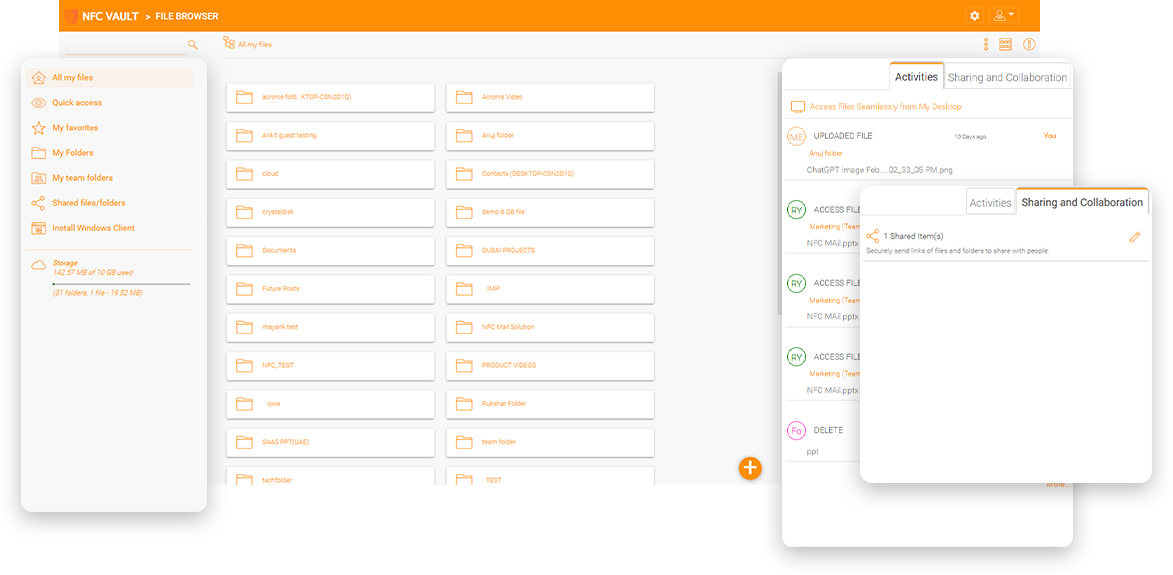
An advertising marketing company has about 60 employees with 6 TB of data. They have a main file server located in the main office. The file server is used as a large repository. They do a lot of design and video editing projects. This creates many larger creative files such as Adobe files, video files, and traditional files. SharePoint is another file repository. SharePoint is not ideal. Uploading and downloading large amounts of data between SharePoint and the local file server is cumbersome. They prefer the current traditional file server because of the large amounts of data. The company needs a creative solution for remote work and is always looking for something better. They want a solution that works with the current file server and provides better performance for remote access to the file server with SharePoint-like experience.


SharePoint is another file service that competes with your existing Windows file servers. Business adopting SharePoint typically cannot fully replace Windows file servers for a variety of reasons. As a result, in many businesses, the SharePoint service and Windows file servers coexist, resulting in data being split across different silos.
Historically, SharePoint administrators have struggled with user adoption in their businesses. SharePoint intranets are clunky with static pages, and a lot of time and money is spent on user interface customization and branding.
Another common complaint is monitoring, with too much irrelevant data dumped on SharePoint sites.
Easy Deployment: SharePoint On-Premises requires at least two servers, a database server, and a storage server that IT must manage. NFC Vault is much easier to deploy on a clean Windows Server.
Familiar User Experience: SharePoint is challenging to learn and use. NFC Vault provides a mapped drive over HTTPS for simplified access from anywhere.
No Additional Training Required: NFC Vault's drive-based access requires no training. Right-click to share or request file transfers
Simplify Management: NFC Vault is much simpler to manage with auditing, reporting and policy-based administration.
Data Leak Prevention: NFC Vault prevents data theft, loss of company data and ensures compliance while still allowing viewing and editing of files and shares over https
Enhance Data Security: With military level endpoint encryption, NFC Vault requires minimum secure connections and network protocol locking. NFC Vault is more secure, with less surface exposed.
Data Remains of your Local File Servers: Unlike SharePoint, which requires you to upload your confidential data, NFC Vault leaves all shared files intact on your file servers. NFC Vault keeps the data in one place, both for file server shares and cloud file sharing, instead of allowing data to scatter.
EndPoint Protection: NFC Vault automatically encrypts data at rest on all your endpoints to improve data protection.
Active Directory and NTFS Integration: NFC Vault provides full native Windows file share and NTFS security integration.
Eliminates Data Sprawl: NFC Vault reduces data sprawl by keeping data on local file servers. Mobile productivity is also balanced by centralized access control management.
Time Saver: With SharePoint, it is very time consuming and costly to migrate existing file server data and train employees to change their daily workflows. NFC Vault is easy to use and requires minimal integration effort.
Hybrid Deployments: With SharePoint, it is very time consuming and costly to migrate existing file server data and train employees to change their daily workflows. NFC Vault is easy to use and requires minimal integration effort.
File Locking: Automatic file locking tied into the file system driver. Also protected by check in/out and versioning
Version Control: Provide an easy-to-access version control history that simplifies recovery from cyberattacks such as ransomware.
Conflict Detection: Prevent accidental modification or deletion of files with additional layers of conflict detection.
Change Notification: With NFC Vault, you can receive automatic alerts that help you keep track of all changes in the system.
"Does SharePoint have a desktop client with a drive mapper?"
"Does SharePoint work with QuickBook or my line-of-business app?"
“Where is my data located, on file servers, or in SharePoint?”
NFC Vault eliminates the common drawbacks of remote file server access and cloud file sharing solutions to provide the best of both worlds: privacy, security, and control of legacy file servers, and combining these with the efficiency and productivity gains of cloud file sharing.
NFC Vault servers can be installed on-premise as a private enterprise file sharing server, integrated with Active Directory and existing file server shares. All users can share files while following security rules and permissions.
Automatically use existing identities and home shares from Active Directory. Existing NTFS permissions for files and folders are natively checked by the Windows operating system.
Use Outlook integration to transfer large files as web links via email, making it easy to share large files without attachment size limitations.
Create a private sync and share solution based on object storage like OpenStack Swift, any S3 compatible storage, Microsoft Azure, and file server network shares.
NFC Vault integrates with Office 365 for web-based co-editing and co-authoring, enabling real-time collaboration on documents.
Granular folder permissions can mirror NTFS permissions or be created natively. Define different permissions for folders at different levels of the directory structure.
Simplify remote access to file servers from mobile devices, PCs, Macs, and browsers, providing secure access to files from anywhere.
In addition to combining Dropbox-style mobility features with the security of Windows file servers, NFC Vault offers numerous features to meet the needs of your enterprise.
Cloud backup and data protection with version control. On-demand sync minimizes storage and bandwidth consumption.
Full support for file locking from the cloud. Encrypt remote agent caches or revoke remote agent access privileges from a central management console.
An alternative for one or more of the following: VPN, DFS, FTP, Dropbox, Box, SharePoint, ShareFile, Anchor, Egnyte, etc.
Combines NTFS permissions, Active Directory users and drive mappings. Advanced reports and usage audits on file-sharing activity from a centralized management console
Simplified remote access from iOS/Android/PC/Mac/Windows Phone/Windows RT mobile devices. From any location, with any device.
Eliminate management costs of servers and VPNs. Avoid the cost of manual files and folders replication or recreation of NTFS permissions.
Integrates seamlessly with current file-based enterprise networks and workflow environments.
Choose different implementations according to your own needs. Simple setup procedure.
Our team will get back to you shortly.