
Experience smoother file performance with NFC Vault. Give your teams secure access to important business files with faster loading, better offline support, and reduced dependency on slow VPN connections.
Learn More →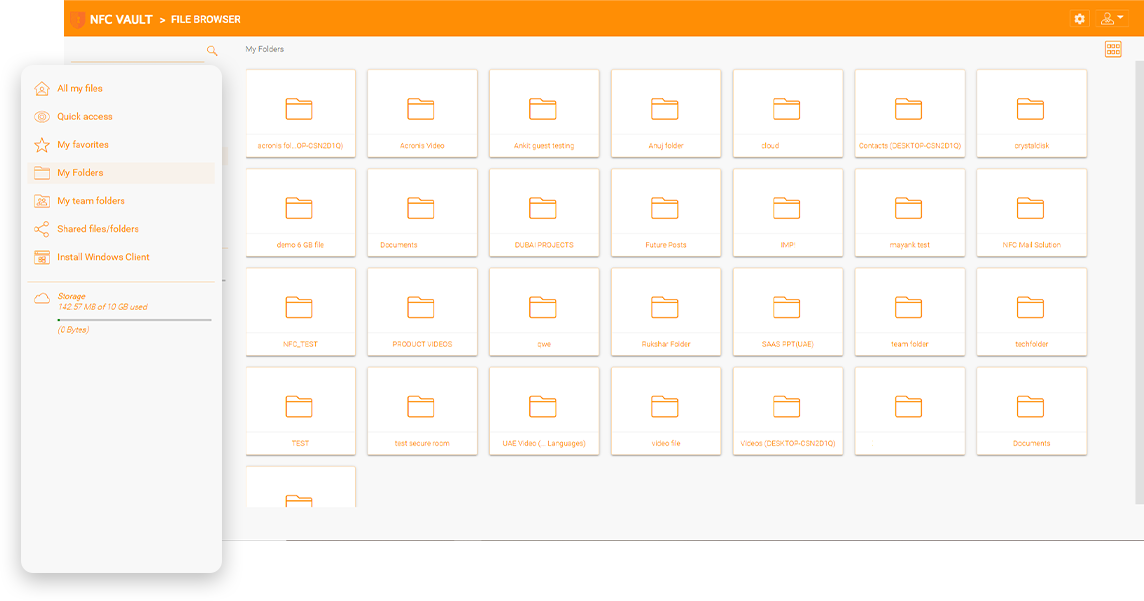
Modern businesses often work across branch offices, remote locations, project sites, and hybrid teams. When files are larger or stored far from the user, daily work can become slow, frustrating, and difficult to manage. Teams may wait longer to open important documents, face sync delay, or depend heavily on unstable internet connections during critical work.
NFC Vault helps solve these issues with a smarter way to manage files availability, speed, and access control without making daily work complicated, it helps improve large file access, reduce repeated downloads, and support smoother collaboration across different locations without making daily management complicated.
Opening heavy documents, CAD drawings, media files, or project folders through traditional remote systems can take too much time and reduce team productivity.
When multiple users work from different locations, files updates may not sync properly. This can create confusion, duplicate files, or outdated versions.
Remote users may struggle when internet speed is weak or unavailable. Without offline support, even simple files work can become difficult.
Managing shared business files across different offices and users become harder when access, permissions, and file updates are not controlled from one secure platform.
Drive mapping is an important feature for online file access. End users can easily drag and drop files and folders from a set of mapped drives over the Internet without a VPN connection.
File locking is a vital feature for online file access and team collaboration to avoid conflicts. End users need to control global concurrent online file access by using file locking to maintain consistency.
Dropbox and Google Drive don’t have the same level of centralized control as a file server. You might miss the NTFS permissions and the ability to know where your data is, who has access to it and what they’re doing with it.
NFC Vault helps businesses work faster with a secure file access model built for remote teams and large shared folders. With local file caching, frequently used files can open faster after the first access, helping users save time during daily work. This makes collaboration smoother for teams working with design files, business documents, project data, and other important digital assets.
NFC Vault Improves large file access by reducing download delays. Users can open important files faster and continues working with fewer interruptions.
File changes are synchronized securely when users are online, helping teams stay updated without manual file transfer or repeated follow-ups.
Users can continue working with availability files even when the connection is weak or temporarily unavailable. This helps remote teams stay productive in real business conditions.
NFC Vault reduces heavy dependency on legacy VPN workflows and complex files access setups. Businesses can support remote users with better speed, control, and security.

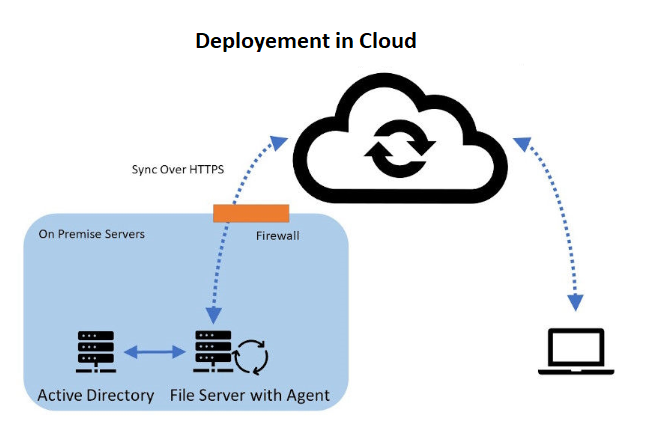
Hybrid Local File Servers
Gladinet enables seamless file server integration with support for Windows 2016/2019/2022, offering indirect & direct connection options and flexible access.
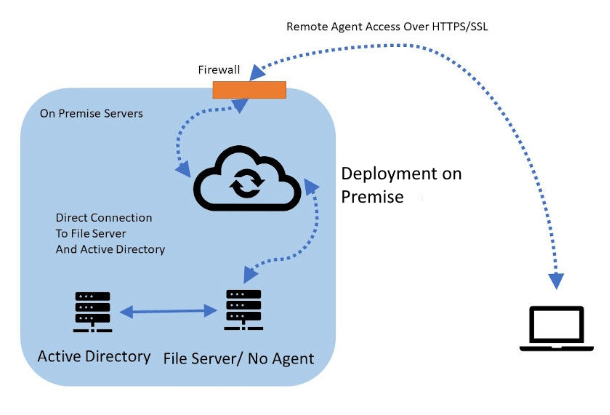
File Servers with Direct Cloud Access
Gladinet provides a direct file access solution from remote devices and mobile devices, offering a streamlined and secure method to access internal file servers via HTTPS/SSL.
The Ransomware Protection feature safeguards your business from cyber threats by monitoring file changes and facilitating rapid recovery. It seamlessly integrates with existing systems to maintain data integrity and ensure business continuity, all while optimizing productivity. This essential component of our NFC Vault and CentreStack solutions offers comprehensive security measures tailored to meet your business requirements.
Integrates with your existing on-premises file servers and cloud services without the need for VPNs.
Disables affected devices upon detecting suspicious activity, halting potential ransomware spread and notifying administrators.
Leverages AWS's stringent security measures for hosting, enhancing protection against external threats
Enables versioning to restore files to their previous state, ensuring data recovery and business continuity after an attack.

A leading engineering firm overcame growth-related IT challenges by implementing NFC Vault's cloud solution, significantly enhancing operational efficiency. This strategic move centralized data access, streamlined remote collaboration, and reduced VPN dependency, marking a pivotal shift towards modernized IT infrastructure. The successful deployment across multiple locations not only optimized IT performance but also aligned with the company's vision for expansion and modernization. This case study exemplifies the transformative impact of innovative cloud solutions on overcoming traditional IT barriers, setting a new standard for the industry.

A healthcare innovator revolutionized clinical trials by adopting NFC Vault's advanced data management solution, overcoming significant operational challenges in data storage, access, and security. This strategic shift enabled seamless integration with cloud storage, eliminating the need for cumbersome VPNs and enhancing operational efficiency. The solution's compliance with health data protection standards and its support for a fully remote operational model marked a pivotal advancement in clinical research methodologies. This case underscores the importance of tailored data management solutions in driving efficiency and innovation in the healthcare sector.
Ensures secure, efficient cloud transition with single sign-on, streamlined user management, and security compliance.
Advanced protection ensures data integrity and recovery with blocking, auto-restoration, and business continuity features.
Seamless cloud integration for secure file access without VPNs or manual setup. Simple and effective management.
Secure remote file access without VPN. Enhanced with NFC vault and CentreStack for high-performance connectivity.
Boost productivity with offline access and background sync — ideal for remote work and unstable internet areas.
Prevents simultaneous file edits to protect document consistency and ensure real-time collaboration.
Our team will get back to you shortly.