
Experience next-level digital storage with NFC Vault — where your data stays safe, accessible, and lightning-fast.
Learn More →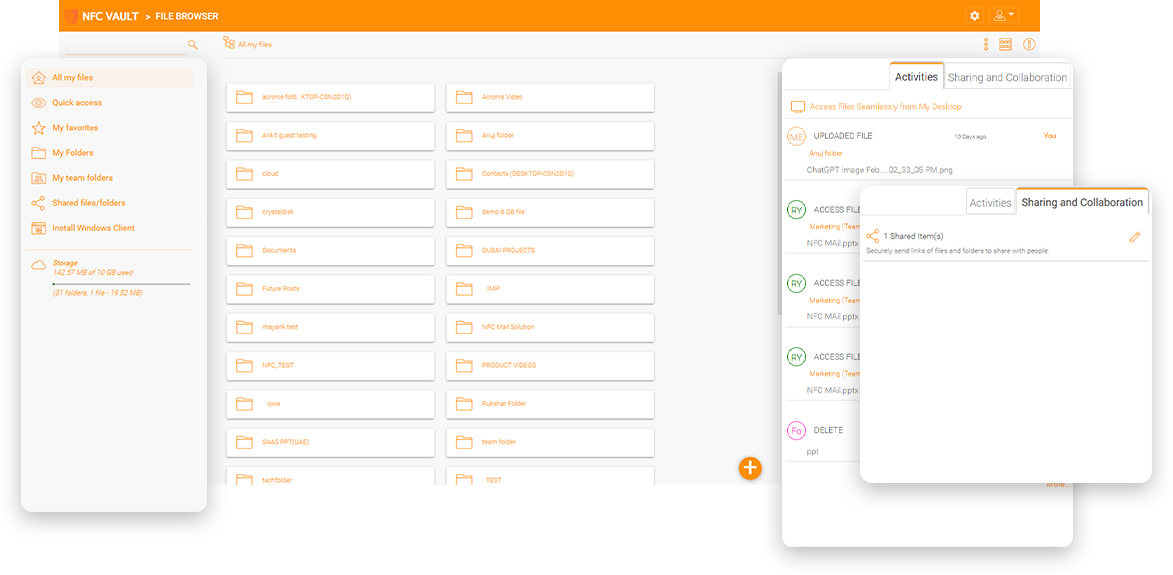
You want to increase remote worker productivity using the cloud and have started with either SharePoint, Box, Dropbox, ShareFile, or a cloud storage solution. However, there are still questions about the following 4 areas that remain unanswered.
If you have data hosted on a third-party site, who owns your data? And who is responsible in case of data loss?
Do you need to adhere to compliance regulations? Are there specific requirements that affect where data is stored?
If the data is hosted elsewhere, who else has access to your data?
Do you fully understand security offered and do you have full control over every step of the way to your data?
NBFC needs a shared storage solution that is not in the public cloud. NBFC needs a shared storage solution, comparable to SharePoint from an end-user perspective, for its external employees and contractors. The storage solution must first integrate with a single sign-on solution and be subject to regular certification audits and must meet certain compliance and regulatory requirements.
In this case, SharePoint is well suited for the general public, but not for organizations that have higher security requirements and compliance regulations. In the end, NBFC uses its own VMWare infrastructure to set up a self-hosted file-sharing solution that resembles SharePoint.


An IT consultant in Canada Quebec has an immediate opportunity that is a government agency. For a government agency, data security is a top priority. They are looking for a secure file sharing solution, but also have concerns about regulatory compliance, security, and data ownership. The file-sharing function can be fulfilled by SharePoint or OneDrive, but they do not want to rely on the "cloud" for compliance. Even the "cloud" provides privacy compliance, but they feel that it is not the same in the "cloud". It's not easy to ask a vendor to do something very specific for a particular compliance requirement. Change management is difficult. However, with an on-premises file server, change management is easy. When something is "local", you feel like you have a lot of control to ensure compliance. They found that NFC Vault, a secure online file sharing solution with the flexibility of managing a local file server, can also facilitate compliance outside of America.
Easy Deployment: NFC Vault is easy to install on a clean Windows Server. You can enable remote file server access without VPN in an hour without data migration.
Familiar User Experience: SharePoint is challenging as a file server migration destination. NFC Vault provides a mapped drive over HTTPS for simplified access from anywhere.
No Additional Training Required: NFC Vault's drive-based access requires no training. Right-click to share or request file transfers.
Simplify Management: NFC Vault is much simpler to manage with auditing, reporting and policy-based administration.
Data Privacy: Businesses can address data privacy concerns by providing access to internal file servers. NFC Vault offers the unique option of cloud-enabling existing file servers to replace cloud file sharing.
Data Security: Files are secured at rest and in transit with military grade encryption and secure connections. Save setup time and money by automatically using existing users and permissions.
Maintain Compliance: Centrally manage users, access controls, and storage for each tenant. Admins can perform audits of GDPR and HIPAA compliance or keep track of any changes that have been made to individual files.
Data Remains on Your Local File Servers: Unlike SharePoint, which requires you to upload your confidential data, NFC Vault leaves all shared files on your file servers intact. NFC Vault keeps data in one place for both file server shares and cloud file sharing instead of allowing data to scatter.
Remote and Mobile Access: Simplify remote access to file shares with familiar instances on any computer or device. Windows and Mac desktops display natively mapped drives in Explorer and Finder. The same experience is presented on iOS and Android devices, as well as popular web browsers.
Simplified Management: Centrally manage users, access, controls, and storage for each tenant. Admins can perform audits of GDPR and HIPAA compliance or keep track of any changes that have been made to individual files.
Folder Permissions Management: For complete control and visibility, permissions can be managed from the source file server or natively with NFC Vault
Hybrid Deployments: With NFC Vault, data saved to file shares is replicated to the cloud and vice versa, to ensure business continuity with hybrid deployments.
Simplified Collaboration: Work with business partners by providing them with access to a limited set of internal files or folders. Share files with non Active Directory users while maintaining administrative controls. Simplify multi-site collaboration with automatic version controls and file locking.
Increase Productivity: Provide a mapped drive that works anywhere on any device and allows mobile users to easily access internal file shares or cloud file servers.
On-Demand Synchronization: Mapped drives display directory structure but delay downloads until a file is used to reduce bandwidth usage and endpoint storage consumption.
Change Notification: With NFC Vault, you can receive automatic alerts that help keep track of all changes in the system.
Reduce Costs with a Simple VPN Alternative: Eliminate the overhead and support tickets commonly associated with VPN file sharing, Always On VPN or Direct Access. Automatically use existing users and permissions to save setup time and money.
White Labeled File Sharing Solution: NFC Vault provides a white labeled platform that makes it easy for MSP partners to build a private cloud file server solution based on infrastructure from Amazon, or Microsoft Azure.
On-Premises Alternative to Dropbox and SharePoint: NFC Vault has the flexibility to provide an on-premises alternative to Dropbox and SharePoint using existing file servers.
The NFC Vault server can be installed and deployed on-premise as a private enterprise file-sharing server. The private enterprise file sharing service can be integrated with Active Directory user identities and existing file server shares. All users, from internal and remote employees to external clients and partners, can share files and folders based on the current file server content and follow certain predefined security rules and permissions. In addition to the existing features such as a locally mapped drive, on-demand synchronization, and file locking, businesses will also get the following modern file sharing features:
Automatically use existing identities and home shares from Active Directory. Existing NTFS permissions for files and folders are natively checked by the Windows operating system.
Create a private sync and share solution based on object storage like OpenStackSwift, any S3 compatible, Microsoft Azure, and more.
Granular folder permissions that can mirror NTFS permissions or get created natively. Define different permissions for folders at different levels of directory structure.
Use Outlook integration to transfer large files as web links via email.
NFC Vault integrates with Office 365 for web-based co-editing and co-authoring.
Simplify remote access to file servers from mobile devices, PCs, Macs, and browsers.
Uncertainty about data ownership and data security when sharing files in public clouds for enterprises and businesses requires a better solution for security managing and sharing your internal data.
With the challenge of accessing traditional file servers from mobile devices and the lack of an enterprise file-sharing service, your employees may choose to use consumer cloud file-sharing solutions such as Dropbox or Office 365. While these solutions offer productivity and are cost-effective, they often fail to ensure data ownership and data security. Public clouds, however, are not secure enough for many enterprises' standards. While they desire the convenience of public cloud storage, enterprises can't help but have concerns about data ownership, privacy, compliance, data splitting, etc.
With third-party cloud file-sharing solutions, company files may be copied onto a personal Dropbox folder for easy sharing, or even sent as email attachments for easy access outside the company's Firewall. As a result, businesses cannot control their files, leading to a high risk of data breaches. In addition to data security concerns, the potential leakage of file server data to third parties is also a significant issue. This involves not only cyber threats and hackers, but also competitors, foreign nationals and governments.

NFC Vault eliminates the common drawbacks of traditional file server access and cloud file sharing solutions, combining both strengths with the following benefits.
Cloud backup and data protection with vendor control. Granular sync restrictions reduce storage and bandwidth consumption.
An alternative for one or more of the following: VPN, DNS, FTP, Graphics, SAP, SharePoint, ShareFile, Active Directory, etc.
Simplified remote access from iOS/Android/Windows mobile devices. From any location, with any device.
Seamlessly integrate into current file-based enterprise networks and workflow environments.
Full support for file locking from the cloud. Enterprise remote agent creates and revokes remote access privileges from a central management console.
Centralize NTFS permissions. Active Directory stores and close monitoring. Address functions on requests not required due to file sharing activity.
Eliminate management costs of servers and VPNs. Avoid the cost of manual files and folders replication or repair of NTFS permissions.
Choose different implementations based on your own needs. Easy process to set up.
Our team will get back to you shortly.