
Experience next-level digital storage with NFC Vault — where your data stays safe, accessible, and lightning-fast.
Learn More →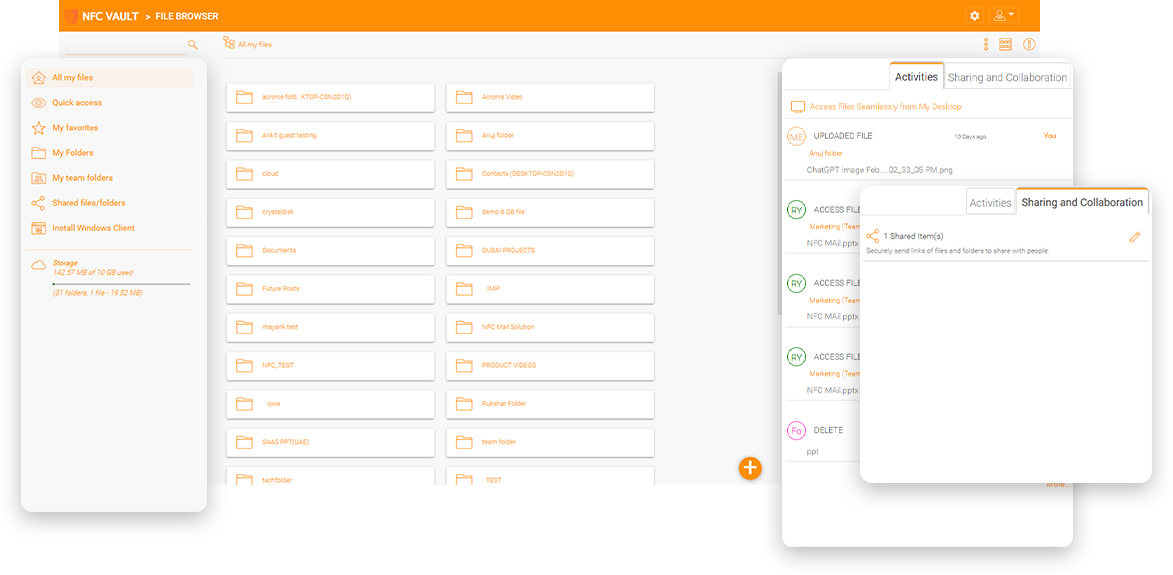
A private investment firm had file servers on site and ran out of file server space. They deployed AWS S3 File Gateway as an on-site virtual appliance and moved files from the file servers to the appliance File Gateway. So far, 2 TB of the total 8 TB data has been moved to AWS. The most important user group in the company is the marketing department.
Since the pandemic, most of them work from home and use client VPN to reconnect to the corporate network and access the S3 File Gateway appliance. They also need to share and receive files from external business partners and customers. The S3 File Gateway houses a mix of Office documents, Adobe Photoshop files, images and videos.

There is no easy way to access S3 File Gateway - If they are outside the office, they have no easy way unless they use a VPN to connect to the office network and then mount a drive letter from S3 File Gateway. Amazon S3 is already in the cloud, and they still have to tunnel back to the office to access it.
No Easy Way to Share with External Parties - Marketing departments need to share files with external vendors, partners and customers. However, a standard file sharing workflow is still to use a VPN to tunnel into the office network and send attachments via email.
There are many tools for S3 access, including CloudberryLab S3 Explorer, ExpanDrive, TntDrive and CyberDuck. However, these S3 direct access tools did not meet the company's needs for two reasons.
The first reason is the ability to integrate with the company's Active Directory infrastructure and SAML single sign-on. The second reason is the ability to share files in the cloud with auditing and history. The company is looking for a "File Server" solution rather than a USB drive as an analogy.
An engineering firm has four offices in Texas. The main office is located in Dallas. More than 50% of the employees work from the Dallas office, while the employees in the other offices access the file servers in the main Dallas office via a site-to-site VPN. There is a mesh SD-WAN network between the four branches, so logically all four branches are like one large local area network. Since the pandemic started in 2020, most employees work from home. So if the Dallas office goes down (due to a power outage in the building, for example), all four offices will not have access to the file servers, and it's a classic single point of failure.
They plan to move the file servers from Dallas to the Azure data center in San Antonio to mitigate the single point of failure. The Azure data center has better Internet bandwidth and power. However, the problem is that employees working from home still have to use a site-to-point VPN to connect to the file servers, which again is a single point of failure.
The on-premise contract with NetApp is expiring, and the CIO does not want to renew it. He hires an on-premise IT consultant to help him move to the cloud. The only stipulation is not to repeat the same NetApp contract over the next few years, but to replace it with something new, modern and something in the cloud. The IT consultant moves the NetApp SMB workload to a regional data center and implements the SMB interface with a NFC Vault solution. The CIO gets a solution that is backward compatible with the on-premises workload while providing a SharePoint-like user interface with a browser interface, mobile apps, and remote access from Windows and Mac to file servers without a VPN.
Combines on-premise file servers and Amazon S3 for secure remote access without the need to use a VPN.
It uses Amazon S3 storage in the Cloud for secure mobile file sharing from a web browser or mobile applications.
It leverages Amazon S3 as a central cloud file repository with version control, file change history, audit tracing, and mobile applications on iOS and Android.
Since Amazon S3 is already in the cloud, accessing the same content as the S3 file gateway doesn't have to go through a VPN to loop back to the corporate network.
Define different permissions for folders at different levels of the directory structure or apply NTFS permissions directly.
The web-based secure data room allows access to shared folders for viewing only, with download disabled.
You can assign internal Active Directory users and external customers and partners to shared folders.
Shared folders are subject to version control, and notifications are available for users who have subscribed to the folders.

Share files with colleagues, customers, and partners Sending emails with multiple attachments has been the norm for years when sending files to colleagues or business partners. However, sharing a folder has never been easy with email attachments. Sharing large files was impossible and blocked by email services. When S3 File Gateway was an on-premise solution with no file sharing capability, the native Amazon S3 behind S3 File Gateway made it easier to share files and folders over the Internet because every file and folder has a "web link" by default.
NFC Vault integrates with Office 365 for web-based co-editing and co-authoring for files inside the shared folder.
Use Outlook integration to share large folders or files as web links via email.
Convert shared files and folders into web links for direct access via web browsers.
Request files from partners, customers, and external parties via web links.
Amazon S3 is the most widely supported cloud storage service, with many technology partners offering S3-integrated solutions for primary storage, backup, recovery, archiving, and disaster recovery. With its industry-leading performance, scalability, availability, and durability, it is used by many organizations.
NFC Vault offers a unique cloud file server solution that integrates Active Directory, NTFS permissions, a remote mapped drive, and file locking capabilities with Amazon S3 cloud storage services.The result is a single solution that combines both the security features of the existing IT infrastructure and the mobility and durability of the Cloud (Amazon S3).
Simplify remote access to file servers from mobile devices, PCs, Macs and browsers with a mapped drive and without a VPN.
Reduce server replacement costs. Eliminate server and VPN management costs. Create a business continuity solution with S3.
Avoid the costs of manually replicating files and folders or restoring NTFS permissions. Inherits Active Directory and permissions.
Avoid the management issues associated with cross-site replication and simplify collaboration with remote offices. Unify data across multiple offices with S3.
Avoid the headaches of splitting data sets between internal file servers and cloud solutions like Dropbox or Box.
Eliminate threats from decentralized security and personal Dropbox and other third-party accounts. Consolidate file structures into S3.
Maintain centralized security controls while enabling remote access. All file access is logged and audited through the NFC Vault solution.
Our team will get back to you shortly.